

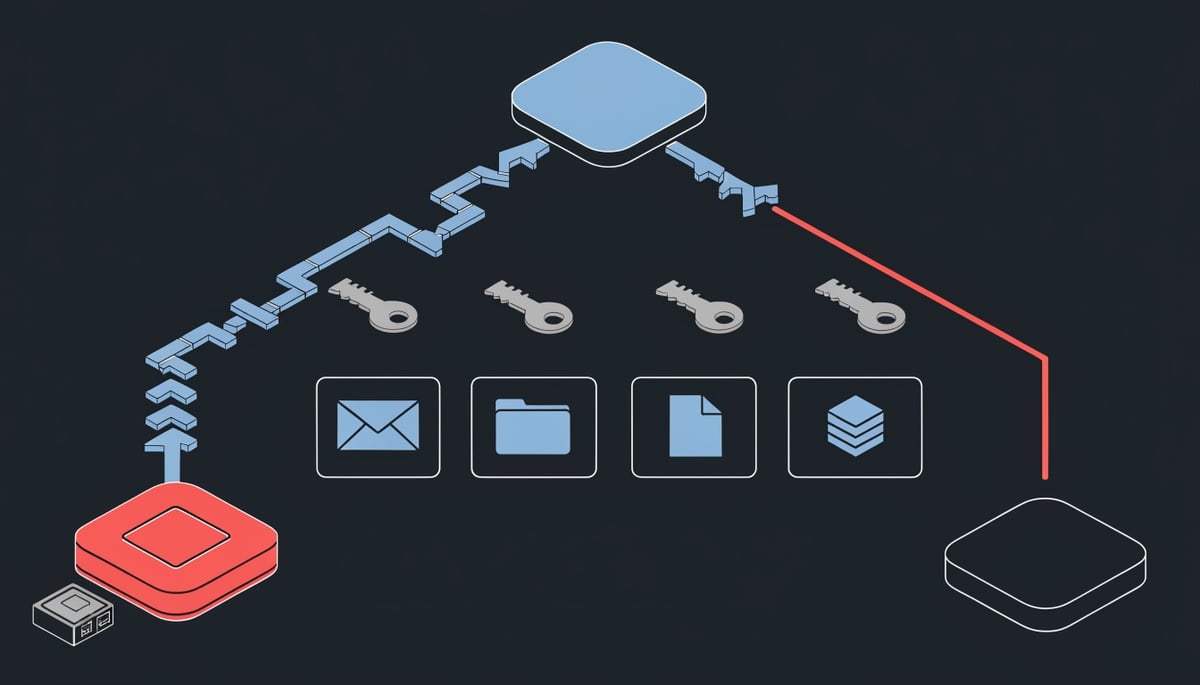
Unit 42 researchers at Palo Alto Networks have published three attacks — collectively named Pass-ta-key — that let malware on an already-compromised Windows machine abuse Google Password Manager's synced passkeys to sign in to accounts, bypass user verification, and extract passkey private keys outright. (Source: BleepingComputer)
None of the three breaks passkey cryptography. They abuse how Chrome and Google's cloud authenticator handle device trust, onboarding, recovery, and synced credentials on Windows devices with a Trusted Platform Module (TPM).
The first technique, Pass-ta-key, uses Chrome's TPM-backed device identity key to sign a request to Google's cloud authenticator. The authenticator treats it as coming from the user's trusted computer and returns a signed authentication assertion. This runs without administrator privileges, without user interaction, without biometrics, and without the device being unlocked.
That assertion carries a User Verified flag. GitHub checked the flag and the attack failed; eBay required verification but did not properly validate the flag, and Unit 42's test succeeded. eBay has since fixed it.
Silver Pass-ta-key goes further. Malware invalidates the existing verification key or deletes the local passkey state file to force Chrome to re-register, then registers a user-verification key the attacker controls — the cloud authenticator does not check whether that key came from trusted hardware. Google then accepts the attacker's signatures as proof that your PIN or fingerprint was used, and the attacker can authenticate from a completely different machine.
Golden Pass-ta-key is the most severe. It extracts the security domain secret, the master key encrypting every passkey synced to the Google account, from Chrome's process memory after forcing re-registration.
"Although Google removed this secret from Chrome's logging output following our report, the SDS is still sent to the client and remains accessible in Chrome's process memory," explains Unit 42.
Stolen passwords get rotated.
Key Insight: Here, the attacker walks away with private key material that works from their own hardware, and Google's implementation reportedly offers no way to rotate or revoke the master key — so passkeys your users sync later stay protected by the same compromised secret.
Attack Chain: From Malware Installation to Passkey Extraction
Every one of the three techniques starts from the same prerequisite: code execution on the Windows endpoint. Unit 42's chain does not begin with a phishing page or a credential stuffing run — it begins after a commodity infostealer, loader, or RAT is already resident in the user's session. That places the entire attack downstream of an endpoint compromise your EDR either caught or missed.
From there, the sequence branches by how much the attacker wants: a single login, durable account access, or the underlying private keys.
Stage 1 — Forging an assertion locally
The lowest-effort path produces a signed authentication response for a target account with no administrator rights, no user interaction, and no biometric or PIN prompt. The limiting factor is the User Verified flag carried inside that assertion. GitHub checked the flag and rejected the forged response; eBay required user verification but did not validate the flag, and the login succeeded. eBay has since remediated. In MITRE terms this sits closest to T1606 (Forge Web Credentials) — the attacker never touches the password, so nothing in your password reset or credential-rotation workflow registers the event.
Stage 2 — Silver Pass-ta-key: planting an attacker-controlled verification key
To defeat services that do validate the flag, the malware forces Chrome into a re-registration cycle. Unit 42 describes two triggers: invalidating the existing verification key, or deleting the local file that holds the device's passkey state. Either action makes the browser believe it must re-enroll with the cloud authenticator.
During that re-enrollment window, the attacker registers a user-verification key they generate themselves. The cloud authenticator does not check whether the new key came from trusted hardware, so Google subsequently accepts signatures from that key as proof the victim unlocked the device with a PIN or fingerprint. This is T1556 (Modify Authentication Process) behavior with a cloud-side persistence payoff.
The operational consequence matters more than the mechanism: once the key is registered, the attacker authenticates from their own machine and no longer needs access to the victim's computer. Wiping and reimaging the endpoint does not remove the attacker's enrolled verification key.
Stage 3 — Golden Pass-ta-key: lifting the security domain secret
The most severe variant targets the security domain secret (SDS), the master key that encrypts every passkey synced through the account. The SDS is transmitted to Chrome during device registration and during account recovery — the same convenience mechanism that lets a passkey follow a user to a new laptop is what puts the master key on the endpoint in the first place.
Unit 42 originally recovered it in plaintext from Chrome's internal FIDO logs, a straightforward T1552 (Unsecured Credentials) read. Google stripped it from logging output after disclosure, which moved the exposure rather than closing it.
If the attacker forces the victim to re-register with the cloud authenticator and knows the pattern to look for, they can extract the SDS directly from memory." — Unit 42
So the full chain becomes: force re-registration, pattern-match the secret out of the browser process, then decrypt the synced passkey records and export the raw private keys. Those keys move to another system and sign in as the victim indefinitely.
Unit 42 reports no mechanism exists to rotate or revoke the SDS, so passkeys the user creates after the theft are encrypted under the same compromised secret. Unit 42 published no file hashes, domains, or malware samples with this research — the behaviors above, not indicators, are what identify the activity. The research covers Chrome on TPM-equipped Windows hosts; no separate Android variant was described.
Business and Operational Impact of Compromised Passkeys
When your users sign in with a passkey, that single credential is both the password and the second factor. There is no separate one-time code to intercept and no password to reset, so an attacker holding a valid assertion or an extracted private key logs in the same way your employee does — as a verified user on a trusted device.
That changes what account takeover looks like in your logs. Your identity provider records a successful passkey authentication from a device it already trusts, which means no failed-login spike, no password-change notification to the user, and no MFA push the employee can reject.
Passwordless sign-in now fronts the services your business runs on: corporate mail, cloud file storage, code repositories, CRM and finance SaaS, and the consumer accounts your staff use on the same Chrome profile. Access to a Google account that syncs passkeys is access to whatever those passkeys unlock.
The practical consequences worth planning around:
- Remediation may not end the access. Unit 42 showed the attacker can authenticate from another system without needing further access to the victim's computer, so reimaging the laptop and clearing the malware does not necessarily close the door.
- You cannot audit whether your SaaS vendors implement verification correctly. GitHub checked the User Verified flag and the attack failed. eBay required user verification but did not properly validate the flag, and the attack worked until it was fixed. Your exposure per application depends on someone else's code.
- The master key has no rotation path. Google's current implementation reportedly offers no way to rotate or revoke the security domain secret, so passkeys you enroll after an incident stay protected by the same secret an attacker already holds.
- Dwell time extends quietly. With no reset event and no anomalous authentication method, discovery usually depends on downstream activity — a mailbox rule, an unexpected data export, a payment change — rather than on the sign-in itself.
For your incident response process, the hardest question becomes attribution. If your mail and storage logs show a legitimately authenticated session, separating your employee's activity from the attacker's requires correlating endpoint telemetry, IP and device fingerprints, and business-record changes, and that work drives up investigation hours and outside forensic costs.
It also complicates your notification obligations. Regulators and clients ask what data was accessed and when; when both parties look identical at the authentication layer, you may end up notifying on a broad assumption of exposure because you cannot prove a narrower scope.
There is a governance angle too. Many organizations adopted passkeys specifically to satisfy phishing-resistant authentication requirements in insurance questionnaires, client security reviews, and internal control frameworks. That control still holds against phishing and credential reuse, but if you documented it as protection against endpoint compromise, your risk register overstates the coverage.
None of this means passkeys were a poor investment. Unit 42 is explicit that passkeys remain significantly safer than traditional passwords, and all three techniques require malware already executing in the user's Windows session. The business takeaway is narrower and more useful: passkeys reduce your credential-phishing risk, and they do not transfer your endpoint risk anywhere else. Endpoint compromise stays the event that determines whether your synced credentials hold.
Detection and Immediate Response Actions
Start by treating the affected Google account as compromised at the sync layer, not just the endpoint. If your EDR flagged an infostealer, loader, or RAT on a Chrome device where the user has Google Password Manager passkeys, reimaging that machine does not undo an attacker-registered verification key or an extracted master secret — both work from a different computer after the original host is clean.
Immediate (first few hours)
- In the user's Google Account, sign out all sessions and remove the compromised computer from the account's device list so it loses its trusted-device standing with the cloud authenticator.
- Regenerate backup and recovery codes for that account, then read the recent security activity log line by line for device re-registration or recovery events you cannot tie to a real user action.
- Hunt on the endpoint for cross-process memory reads against
chrome.exeby processes that are not part of Chrome (MITRE ATT&CK T1555.003, credentials from web browsers). Golden Pass-ta-key's memory extraction leaves that access pattern behind. - Look for deletion or tampering of Chrome's local passkey state file and for repeated re-registration attempts against the cloud authenticator. Forced re-registration is the required precondition for both Silver and Golden Pass-ta-key, and it is a rare event on a healthy device.
The Silver technique's payoff is authentication from a system you have never seen. Check passkey-backed logins against known device and network baselines, so an assertion arriving from an unfamiliar host or ASN surfaces as an identity anomaly rather than a clean sign-in.
24 to 48 hours
Build a list of every service your users authenticate to with a Google-synced passkey, and sort it by what an attacker gets on login — payment rails, source code, cloud consoles, HR data. Unit 42 found GitHub rejected a forged assertion because it validated the User Verified flag, while eBay accepted one until the flaw was fixed, so a service's own verification logic decides whether the first attack works at all.
- If your team operates a relying party, confirm your WebAuthn verification code checks that
uvis actually true in the returned assertion, instead of only requesting user verification during the ceremony. - Delete and re-enroll passkeys for high-value accounts from a device you have confirmed clean, then rotate OAuth refresh tokens, app passwords, and API keys tied to those accounts. Sessions minted from a forged assertion outlive a credential change.
- Because Google's implementation offers no way to rotate or revoke the security domain secret, any new passkey synced to a previously exposed account stays encrypted under the same stolen key. For your most sensitive accounts, move the credential to a separate account or to a non-synced authenticator.
Longer term
Move administrator, finance, and source-control logins to discrete FIDO2 hardware security keys. The private key never leaves the token and never enters a cloud sync domain, which removes the master-key extraction path entirely for the accounts you care about most.
Then gate the sync itself. Use conditional access so devices with a stale or disabled endpoint agent cannot enroll as trusted passkey devices, and require attestation on registration where the platform supports it so an unverified key cannot pass as trusted hardware. Document which accounts still rely on cloud-synced passkeys, and review that list at the same cadence as your privileged-access review.
Preventing Pass-ta-key Attacks: Technical and Organizational Controls
The single most effective control is to stop cloud-synced passkeys from being the only credential protecting your most sensitive accounts. A discrete FIDO2 hardware security key generates and holds its private key inside the token, so it is never handed to Chrome, never encrypted under a synced master secret, and cannot be exported by software running on the host. Issue those keys first to administrators, finance approvers, and anyone who can change identity configuration or move money.
Write the requirement down so it survives staff turnover. Two lines of policy cover most of it:
- "Passkeys must not be synced to cloud credential managers on personally owned or unmanaged devices."
- "Access to administrative, financial, and identity-management systems requires a hardware-backed key registered to a corporate-managed device."
- "Every passkey registered against a business account must be recorded in the credential inventory, with the device and authenticator type noted."
Next, constrain where passkey authentication is allowed to happen at all. Conditional access rules that require a compliant, enrolled, attested device before a passkey assertion is accepted remove the unmanaged laptop from the equation, which is where infostealer infections concentrate. For consumer-grade risk, turning off Google Password Manager passkey sync on shared or high-exposure machines keeps a single compromised host from surrendering credentials that also work elsewhere.
All three techniques depend on code already executing in the user's session, so endpoint prevention is the control that stops the chain before Chrome's process memory becomes reachable. Pair that with prompt Chrome and Windows patching, since these attacks land on fully functional TPM-equipped hosts and the fixes for the logging exposure and the eBay validation flaw arrived through vendor updates.
Audit what else on the endpoint can talk to credential storage. Inventory browser extensions and any third-party application granted access to credential manager APIs, and remove anything without a documented business owner. Unapproved software with that level of access reads the same local state the attacker manipulates during forced re-registration.
If you operate customer-facing or partner-facing web applications, fix your own relying-party validation. Unit 42's recommendation is direct: require user verification and then actually check the User Verified flag in the returned assertion. eBay required verification but did not validate the flag, and the assertion was accepted; GitHub checked it and the attack failed against that service. Add a test case to your authentication test suite that submits an assertion with the flag unset and confirms the login is rejected.
Plan for the fact that the security domain secret cannot currently be rotated or revoked. That means your recovery playbook for a confirmed infostealer hit on a passkey-holding device should assume credential migration — re-register affected accounts against new authenticators, and prefer hardware keys for anything you cannot afford to migrate twice. Where the source of truth is a personal Google account rather than a corporate identity provider, decide now whether that account should hold business credentials at all.
Review the hardware-key rollout quarterly against your list of privileged roles, and confirm the conditional access rule still blocks unattested devices after each identity platform change.
Why Passkey Sync Convenience Creates This Risk
Passkeys come in two shapes, and the difference decides whether malware on the host can ever touch the private key. A discrete FIDO2 authenticator generates its key pair inside the token and performs the signing operation on the token, so the operating system only ever sees the finished assertion. A synced passkey has to exist in a form that can be copied to a second device, which means the private key must be decryptable outside the hardware that created it.
That portability is the entire product feature. Users replace phones, lose laptops, and expect to sign in from a new machine without re-enrolling every account, so Google Password Manager encrypts passkey records under the security domain secret and hands that secret to each client that legitimately joins the account. The credential stops being bound to one piece of silicon and becomes a synchronized record protected by a key that travels.
The WebAuthn specification acknowledges this split. Credentials are marked as device-bound or as multi-device credentials that may be backed up, and a relying party can read that signal in the authenticator data it receives. Most consumer services accept both without distinction, so the account that your administrator secured with a hardware token and the account secured with a browser-synced record look nearly identical on the server side.
Centralizing trust in the sync mechanism moves the security boundary from hardware to software. Three things that a security element normally enforces become software decisions in the synced model:
- Where signing happens — inside a tamper-resistant chip versus inside a userland browser process that other code on the same machine can read.
- Who counts as a trusted device — an attestation chain rooted in the manufacturer versus a registration record the cloud service accepts on the client's word.
- What proves the human was present — a fingerprint sensor wired to the authenticator versus a flag and a separate key that a server evaluates remotely.
Each of those maps to well-understood adversary behavior. Reading decrypted key material out of a browser's address space is T1555.003 (Credentials from Password Stores: Credentials from Web Browsers), and producing a valid assertion the account provider accepts as genuine is T1606 (Forge Web Credentials). Both are techniques defenders already hunt for against cookie and password theft, which is why the same infostealer families that scrape saved logins are positioned to reach synced passkey state with no new capability.
The recovery path is the structural weak point rather than a bug. Any credential that survives losing your only device needs a mechanism to re-establish trust on replacement hardware, and that mechanism, by definition, has to work for a client that cannot yet prove it is the original machine. Malware sitting in the user's session inherits that same starting position.
For a business, this means the advice to "adopt passkeys" is incomplete without specifying the storage model. Synced passkeys remove phishing, credential reuse, and password database exposure from your risk register, and that is a real reduction in the attacks most organizations actually face. They do not remove endpoint compromise, so an account protected only by a browser-synced passkey is protected to the strength of the host it syncs to.
Hardware-backed and synced credentials therefore belong in different tiers of an account inventory. High-value accounts — identity administration, payment authorization, code signing, domain registrars — carry consequences that a software-resident key cannot contain once the endpoint falls.
Key Takeaway: Passkey Security Depends on Device Trust
Passkeys took phishing out of your sign-in flow, and that gain is real. What they did not take out is the endpoint. When the credential lives in a browser profile and syncs through a cloud authenticator, the assurance behind every sign-in is inherited from whatever state that machine is in at the moment of authentication.
That changes how you should evaluate a passkey rollout. The useful question is no longer how strong the cryptography is — it is what your endpoints can be trusted to assert on your users' behalf. A platform authenticator speaks for the machine, so your identity assurance ceiling is set by your endpoint assurance floor.
Treat device security as a precondition of the deployment rather than a parallel workstream. Before you enroll an account class in synced passkeys, you should be able to answer two things: whether that device population is under active endpoint monitoring you trust, and whether the account in question can tolerate a credential that exists in software on a general-purpose computer.
Every technique Unit 42 demonstrated starts after code execution on the Windows host — which means your passkey program is only as sound as the endpoint program underneath it.
There is also an audit dimension. If a passkey-authenticated account is later implicated in fraud or a data exposure, you will be asked what device trust that authentication rested on, and "the platform handled it" is not an answer that survives review. Documenting which account tiers use synced credentials, and why, gives you something defensible.
Passkey compromise is silent and fast; prevention through device hardening is essential.




