

Between May 2026 and August 2026, Huntress employees received fake Shopify order notifications inside the Shop app itself, part of a fake refund scam also documented by researchers at Gen Digital and by Shopify users on Reddit. The notifications arrive through Shopify's own infrastructure, so there is no spoofed domain and no lookalike sender address to catch. Original reporting for this article comes from Huntress.
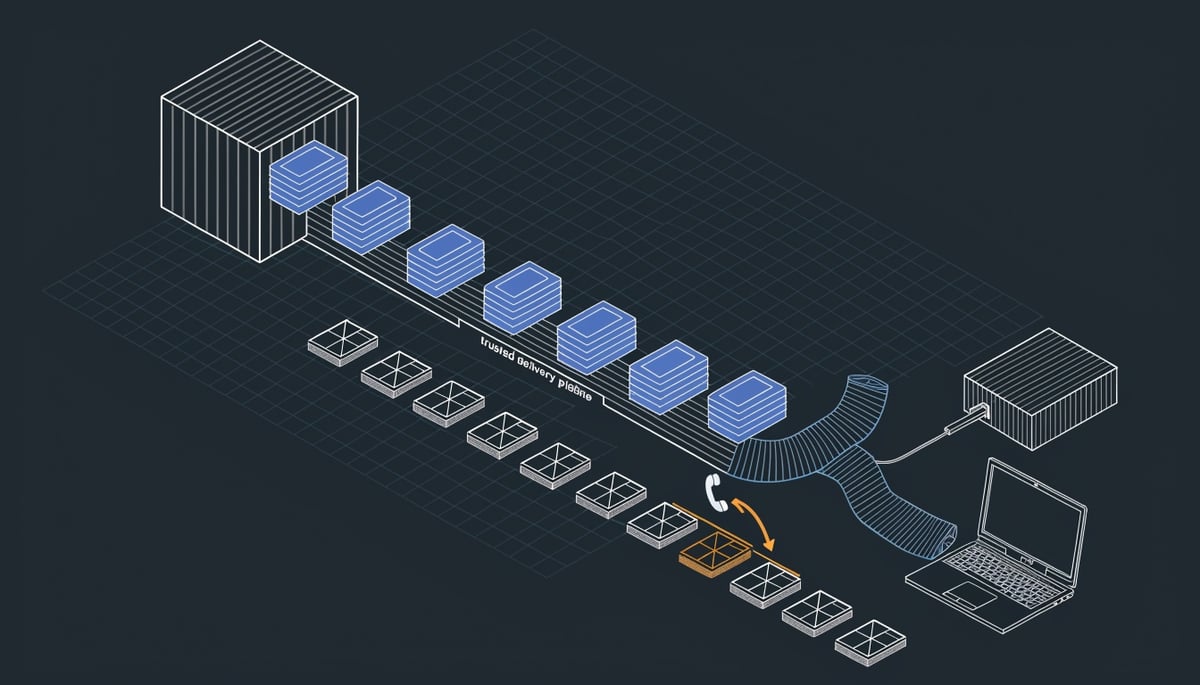
The mechanics are simple. Scammers either register their own Shopify store or take over a legitimate one, then create a fake order with the target's phone number or email address as the recipient. That generates a real push notification on the victim's phone and a real-looking receipt inside the Shop app.
One receipt observed on August 7 billed $339.96 for a "premium PC protection plan," complete with an invoice number, a transaction ID, and a support phone number listed three separate times. The scammers reused the shipping address field as a message board:
"2856 If You Didnt Place This Order Call Us at 1__888__690__3420", Albany NY
The store behind it, named "My Store," was pulled down before it could be examined further. Other variants dropped the shipping address entirely and pushed the callback number in the item description, and some abused the Shop app's "out for delivery" tracking timeline so the fake purchase appears to be physically on its way.
If you or an employee calls that number, the conversation moves to a standard refund scam. The caller is walked through installing ScreenConnect or AnyDesk, then asked to log into online banking so the scammer can see the balance and obscure the screen while shuffling money between accounts. Some operators open cmd.exe or PowerShell to simulate a connection to a "secure banking server."
The deception works because every technical signal your staff has been trained to check, the sender, the domain, the app, is genuine. Only the order is fake.
Attack Chain: From Fake Refund Message to Remote Access Takeover
The chain has no malicious link and no attachment. It starts with a phone number, which is why the lure holds up against filtering and reputation checks that look for URLs and file payloads.
One receipt observed on August 7 billed the recipient $339.96 for a "premium PC protection plan" and carried an invoice number, a transaction ID, and a callback number listed three separate times. The scammers repurposed the shipping address field to carry the instruction directly: 2856 If You Didnt Place This Order Call Us at 1__888__690__3420", Albany NY. The underscores in place of dashes give the number a format that plain digit-pattern matching does not always catch.
Variants drop the shipping address entirely and put the number only in the item description. Others use the Shop app's "out for delivery" status on the shipment tracking timeline, so the target sees a package apparently in transit against a charge they never made. That is the pressure step. It converts a billing question into something the victim believes has a clock on it.
Once the target calls, the operation becomes a voice-driven social engineering session, which ATT&CK tracks as phishing for information over the phone paired with impersonation (T1656). The scammer confirms the "unauthorized" charge, agrees to process a refund, and says the bank requires a supervised session to complete it.
The next step is installation of remote access software, typically ScreenConnect or AnyDesk (T1219). Both are signed, commercially licensed tools used daily by legitimate IT providers, so the installer passes reputation checks and the resulting session looks like sanctioned remote support. For a business, that matters: if the victim used a work laptop, an outside operator now has interactive desktop control of a domain-joined host, and the telemetry shows a normal support tool rather than malware.
With control established, the scammer directs the victim to log into their bank. The remote session serves two functions. It shows the operator exactly how much money is available, and it lets them obscure or blank the victim's screen while they move funds between checking and savings accounts to fabricate the appearance of an inbound deposit. Some operators edit the transaction's HTML in the browser so the balance line reads as a completed refund.
Refund scammers commonly add a console component for credibility, opening cmd.exe or PowerShell (T1059.001 and T1059.003) to "connect to a secure banking server," or pushing the victim through a fake refund form. The scrolling output is theater. The shell itself is real, and any command executed in it runs with the victim's privileges on the host.
The payout step uses a manufactured overpayment. The operator has the victim type a refund figure, then adds a digit so the fabricated deposit appears far larger than owed. They then claim the victim will lose their job or face other consequences unless the excess is returned, and direct them to buy gift cards, usually Google Play, and read out the card details. Those codes get redeemed for cash or resold quickly.
Endpoint artifacts from a completed session include an installed remote support client running as a service with its own session logs, an unattended access configuration the victim never removed, a browser session authenticated to a banking site, and console history under the user's profile. The remote tool usually stays installed after the call ends, which leaves the operator a path back to the machine.
Business and Financial Impact on E-Commerce Operations
The financial loss in a refund scam does not come from a breach of your systems. It comes from your own bank session, opened voluntarily, with a stranger watching through remote access software while funds move between your checking and savings accounts to fabricate the appearance of an overpayment.
That distinction matters for how you account for the loss. Money sent as gift card codes, or wired back to "correct" a refund that never happened, is authorized by the account holder. Recovery through your bank is far harder than it is for an unauthorized transaction, and card network chargeback protections generally do not apply to gift card purchases.
If the person taking the call is one of your employees on a personal phone, the exposure does not stay personal. Remote access tooling installed during the call sits on a device that may also hold your corporate email, your MFA authenticator, and cached credentials for SaaS accounts. A scammer who was only after a gift card payout still ends up with a foothold on a machine that touches your business.
- Credential exposure: Anything typed during a screen-shared session, including banking logins and password manager entries, is visible to the caller.
- Persistent access: Remote access agents installed under the guise of "support" often remain after the call ends.
- Follow-on targeting: Victims who pay once are frequently recontacted, sometimes by callers posing as recovery services.
For merchants, the damage runs a different direction. The scam notifications arrive through the same pipeline that carries your legitimate order confirmations and shipment updates, including the out-for-delivery tracking view. Every customer who learns that a Shop notification can be a scam becomes slower to trust yours.
That erosion shows up in your support queue first. Customers call to verify orders they did place, ask whether charges are real, and report notifications you never sent. Your team spends time on inquiries that generate no revenue, and some customers disable push notifications entirely, which removes a channel you rely on for delivery updates and post-purchase engagement.
There is a specific reason Shopify's platform works so well as the delivery mechanism. The Shop app is used by a large base of consumers who have already saved payment methods and shipping details, and who have been trained to treat in-app receipts as authoritative. Scammers do not need to build credibility because your platform already supplied it.
Storefront quality is part of the picture too. Many of the shops used in this campaign were brand-new, with some carrying nothing more than a "coming soon" description, and several were removed before they could be examined further. Legitimate merchants absorb the reputational side effects of that account churn.
The compliance angle depends on what actually gets touched. If a scammer reaches a system where cardholder data is stored or processed, your PCI DSS obligations come into play, including the requirement to investigate and document the incident. If personal information belonging to customers or employees is accessed, state notification laws may require disclosure within defined timeframes, and those clocks start at discovery rather than at confirmation of harm.
For a small merchant, the practical cost is measured in three places: the funds your staff or customers hand over, the hours your team spends triaging fraudulent order reports, and the customers who stop opening your notifications. None of those show up as a security incident in your logs.
Detection and Immediate Response for Compromised Devices
If someone walked you through installing remote access software during a call about an unrecognized Shop order, disconnect that device from the network first. Pull the ethernet cable or turn off Wi-Fi at the adapter level before you close any windows, because the person on the other end can see what you do next and can reconnect while you are still reading instructions.
Then end the remote session processes. AnyDesk.exe and ScreenConnect.exe both show up in Task Manager, and ScreenConnect also installs a Windows service that will restart the client after you kill it. Uninstall through Programs and Features, then confirm the service is gone rather than assuming the uninstaller cleaned up after itself.
Change passwords from a different, known-clean device. A laptop that just hosted an attacker-controlled session is not the place to type new credentials. Start with online banking, then the email account tied to it, then the Shop account, and call your bank using the number printed on your card to flag the session and freeze transfers between accounts.
Unmanaged home or personal devices are where these scams do most of their damage, so treat any staff member's personal machine used for work email as in scope.
Within the next day or two, work through persistence. A refund scammer with an interactive session has the same access an administrator would, and the cleanup is the same as any hands-on-keyboard intrusion:
- Scheduled tasks created on or around the date of the call, especially ones invoking PowerShell or a script in a user profile directory
- Startup folder shortcuts and Run registry entries added the same day
- New or renamed Windows services with generic-looking names
- WMI event subscriptions, which survive reboots and rarely appear in casual checks
- New local accounts, or an existing standard account promoted to local administrator
Run a full scan with your endpoint agent afterward, not a quick scan. Then review your cloud accounts for the things a password change does not fix: active sessions, linked devices, and mailbox forwarding or filter rules that quietly copy incoming mail elsewhere. Revoke every existing session, re-enroll MFA, and check that recovery phone numbers and backup email addresses are still yours.
Longer term, pull the command line history. If the caller had the victim open Command Prompt or PowerShell to reach a "secure banking server," those commands left traces. Enable PowerShell script block and module logging if it was not already on, and review what ran during the session window for outbound connections to unfamiliar hosts, credential dumping attempts, or archive utilities being used to bundle files.
Check whether anything left the machine. Look for large recent uploads, newly created archives in temp or user directories, and browser downloads that nobody recognizes. Then watch the financial side for weeks, not days, since account details captured during the session can be used well after the call ends.
Report the fake order in the Shop app as "Not my order" and contact Shop Support if you believe account data was exposed. Confirm with your bank whether a charge actually posted, because in many of these cases no transaction exists at all and the entire pretext collapses once you check the statement.
Prevention: User Education and Merchant-Side Protections
The one rule that stops this scam cold: never call a phone number that appears inside an order notification you did not expect. Look up the merchant or platform contact yourself, through the app's own support section or a number you already have on file, and verify the charge from there. Every step that follows in a refund scam depends on the victim dialing the attacker's number first.
Teach your staff and family members three recognition rules that hold up regardless of how convincing the notification looks:
- A refund never requires you to install software. No legitimate company needs screen-sharing or remote support access to return money to a card or bank account.
- No legitimate support agent will ask you to open your online banking while they watch, or ask you to type commands into a terminal window to reach a "secure banking server."
- If you are being told to stay on the line, keep the call going while you check something, or act before an account closes, the call is the attack.
Before you assume a charge is real, check the account you would have paid from. If nothing left your bank or card, there was no purchase, and you can mark the order as "Not my order" in the Shop app and contact Shop Support directly. Shopify has documented this scam pattern in its Help Center, which is worth linking in your own internal awareness material rather than describing from memory.
When you do buy through Shop, read the storefront and its product reviews before ordering. Many of the shops used in this campaign were brand new, and some carried nothing more than a "coming soon" description. A store with no history and no customer reviews is worth reporting to Shop if the order attached to it is one you never placed.
For merchants, the exposure is account takeover. Require multi-factor authentication on every staff account with admin access, review your staff list for accounts belonging to people who have left, and cut permissions back so that only the people who need order creation and customer contact fields can use them.
Key Insight: Attackers running this scam need somewhere to originate orders from, and a compromised legitimate store is more useful to them than a fresh one because it has history and survives longer before removal.
Rotate API credentials and access tokens for private and custom apps on a schedule, and revoke tokens for any integration you no longer run. Review connected apps and active sessions, and log out sessions you do not recognize. Sign-in notifications and password change alerts are the earliest signal you will get that someone else is in the account, so route them to a monitored inbox instead of a personal one.
Tell your customers what you will and will not do. A short note on your order confirmation pages and support page stating your real support number, and stating plainly that you never ask customers to install remote access software or call a number printed in a shipping address, gives people something concrete to compare against.
This is a training problem more than a filtering problem. The notification arrives through legitimate infrastructure and carries a phone number rather than a link, so there is no domain to block and no attachment to scan. The control that works is a person who recognizes the pattern and hangs up.
Key Actions for Shopify Users and Merchants
Shopify's platform is working as designed here. There is no vulnerability to patch, no build number to check, and no configuration flag that changes the outcome. What the scammers borrowed is the credibility your Shop app already has with you, which is why the defense is a judgment call rather than a control.
Treat any refund conversation that asks you to install software as finished at that moment. Legitimate refunds move through the payment method that was originally charged, and they do not require you to be watching a screen while someone else drives your machine. That single rule breaks the chain regardless of which brand the notification imitates or how polished the receipt looks.
When you want to confirm whether an order is real, do it inside the Shop app or through Shop Support directly. Shopify has acknowledged this scam pattern in its Help Center, so support staff know the behavior. It is also worth looking at the store itself before you accept an order as genuine, since many of the shops used in this campaign were brand new, and some carried nothing more than a "coming soon" description.
If you run a store on Shopify, tell your customers in plain language how your refunds actually work: which channel you use, what you will never ask them to do, and where your real support number lives. Customers who know your process have a reference point when a fake order lands in their app claiming to be from a merchant they trust. That clarity costs you a paragraph on your storefront and a line in your order confirmation emails.




