

Scammers posing as HR staff at well-known companies are running fake interview scheduling flows that end with a stolen corporate password, according to research from Zimperium. The lure is ordinary: a recruiter reaches out, a scheduling link follows, and the target lands on a login page to confirm the appointment. The activity described here was documented by Help Net Security.
The technique behind it is called browser-in-the-browser (BitB), documented earlier by CTM360 in its work on recruitment phishing. On a desktop, BitB draws a fake browser window inside the real one, address bar and all, so the counterfeit login looks like a genuine pop-up from a trusted provider.
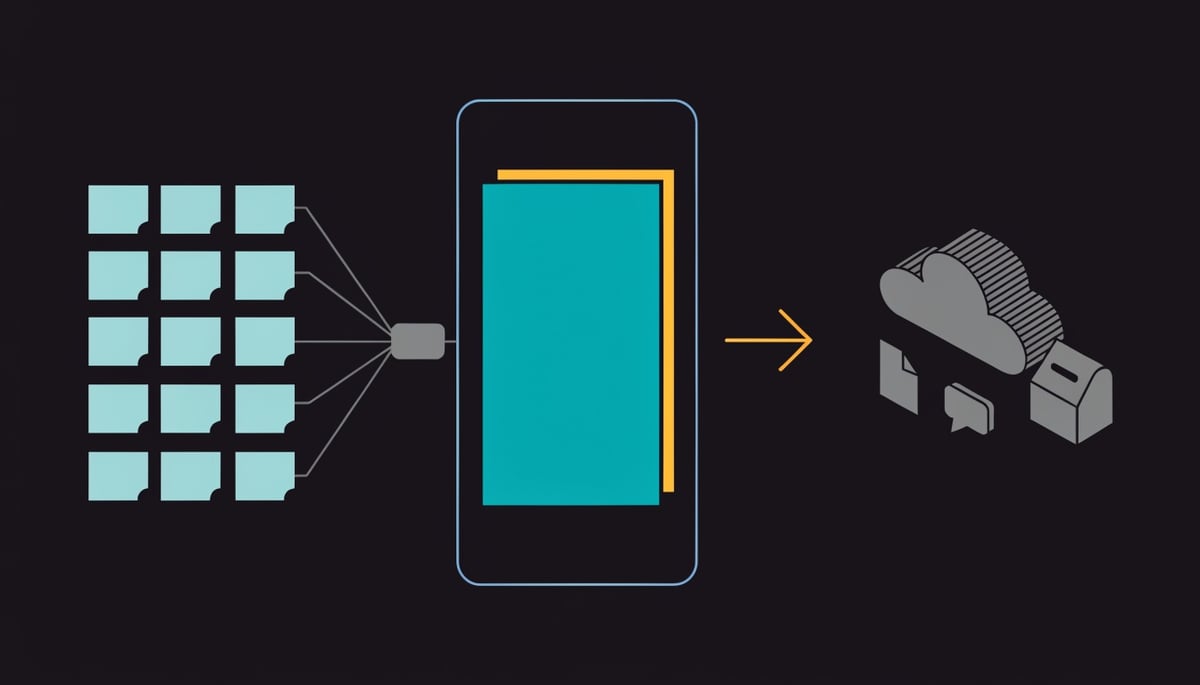
Phones change the math. There is no window frame and no address bar to inspect, so the kit drops the window mimicry and serves a fake login page that covers the entire screen. If your staff open a recruiter link on a company phone, there is nothing on screen to check the page against.
Attackers scrape public profile data to build the approach, which is why the scheduling flow reads as plausible rather than generic. That matters for your organization because the people most worth recruiting, senior staff and specialists, are also the people with the broadest system access.
The kit also filters its victims. Zimperium describes "the attacker's strict pre-qualification logic": the page inspects what the victim types and rejects personal email addresses outright. Only corporate accounts are allowed through.
"By enforcing the use of corporate credentials, threat actors specifically target high-value enterprise access. Once inside a single corporate account, attackers gain immediate access to OAuth tokens, internal communications, and cloud applications, enabling rapid lateral movement across the organization," Zimperium researchers noted.
The brands used as cover span e-commerce, luxury goods, aviation and retail, including Amazon, Louis Vuitton, Apple, FIFA, Emirates Group, Boeing, Heineken, Deloitte, Central Network Retail Group and Lego. A single harvested password from one of these flows gives an attacker a working identity inside your tenant, with the permissions that account already holds.
Attack Chain: From Initial Contact to Credential Theft
The campaign starts with public data. Attackers scrape profile information (employer, job title, career history) and use it to build a scheduling flow that matches what the target would expect from a real recruiter at that company. This maps to MITRE ATT&CK reconnaissance techniques such as T1593.001 (search social media) and T1589 (gather victim identity information), and it is why the outreach reads as tailored instead of generic.
Infrastructure comes next. Zimperium tracked lookalike domains for a year and found consistent naming conventions, most often [company]-careers.com and [company]-global.com. That pattern is the single most useful string-level indicator to hunt for in DNS and proxy records.
The hosting behind those domains is less exotic than you might expect. At the Autonomous System Number level, Amazon Web Services and SEDO GmbH show up most frequently, meaning the phishing pages sit on the same shared, reputable networks that carry ordinary business traffic. Reputation-based blocking has little to work with, and newly registered lookalikes stay live for a window before blocklists catch up.
Delivery follows the recruiter persona: an interview scheduling link that resolves to a credential capture page. On mobile there is no window chrome or address bar for the victim to compare against, so the fake portal occupies the full screen and the usual visual verification step never happens. This is T1566.002 (spearphishing link) executed against a form factor where desktop-centric web gateways have limited visibility.
The most distinctive part of the kit is what Zimperium described as "the attacker's strict pre-qualification logic." The page inspects the address a victim types and rejects personal email addresses outright. Only corporate accounts are allowed to proceed to the password field, which means the operators are filtering their own victim pool for enterprise access before spending any further effort.
OAuth token access matters more than the password itself. Tokens grant application-level access to mail, file storage, and chat without re-prompting for authentication, which lines up with T1550.001 (application access token) and T1078.004 (valid cloud accounts). For a business, that translates to an intruder reading internal threads and pulling documents while appearing in logs as a legitimate employee session.
The brand impersonation list spans sectors, which tells you targeting is opportunistic on the lure side and selective on the credential side. Named brands include:
- Amazon, Apple and Lego
- Louis Vuitton and Heineken
- Emirates Group and Boeing
- Deloitte, FIFA and Central Network Retail Group
Zimperium published 46 indicators of compromise tied to this activity that had not been publicly released before, covering the domains and hosting used in the campaign. Those IOCs are the concrete artifacts to feed into DNS logging, and the domain naming pattern gives you something to search for even against infrastructure that has not been catalogued yet.
The chain, end to end, is short: scraped profile, tailored recruiter message, lookalike domain on mainstream hosting, full-screen mobile login page, corporate-only credential filter, then token-backed access to cloud applications. Each stage uses ordinary components, which is what keeps the campaign inexpensive to repeat across brands.
Business and Compliance Impact of Compromised Corporate Credentials
A single stolen corporate password does not stay a password problem for long. Zimperium's researchers describe what follows plainly: once inside a corporate account, attackers gain immediate access to OAuth tokens, internal communications, and cloud applications, which enables rapid lateral movement across the organization. OAuth tokens matter because they are pre-authorized grants that let an application keep reading your mail or files without prompting for the password again, so revoking the password alone does not always close the door.
Think about what one of your employees' accounts actually reaches. Corporate email history, shared drives, the CRM, the finance portal, internal chat, and any SaaS app tied to single sign-on. An attacker holding those credentials looks like the employee to every one of those systems, which is why the activity blends into normal usage and why investigations take longer than a straightforward malware case.
The mobile angle changes your detection picture. The phishing kit is built to work on a phone, where the credential is typed on a device that usually sits outside your desktop web gateway and your endpoint agent's coverage. Zimperium's own conclusion points at this gap, noting that defending against these campaigns requires looking beyond desktop-centric web gateways and securing corporate identities at the mobile touchpoint. In practice, you may have no browsing telemetry at all from the moment the credential is entered.
The compliance consequences attach to what the attacker reads, not to how the credential was taken. If the mailbox or cloud storage held personal data on EU residents, GDPR notification timelines apply and your clock starts when you become aware of the breach. US state breach notification statutes carry their own definitions and deadlines, and a mailbox holding records for customers in multiple states can trigger several of them at once. Costs you should expect in that scenario include:
- Forensic review of every message and file the compromised account could reach, which is usually billed by the hour and scales with mailbox size
- Legal counsel to determine which statutes are triggered and what language the notices must use
- Notification and credit monitoring for affected individuals
- Regulator correspondence and, where applicable, financial penalties
Vendor and partner relationships extend the blast radius. If the person who falls for the fake interview scheduling flow holds credentials into a client tenant, a partner portal, or a shared project workspace, your incident becomes your customer's incident. Contractual notification clauses in your MSA often require you to tell them before you have finished your own investigation, and that conversation is difficult when the entry point was an employee's phone.
There is a second-order effect for the brands being imitated. The domains Zimperium tracked impersonate Amazon, Louis Vuitton, Apple, FIFA, Emirates Group, Boeing, Heineken, Deloitte, Central Network Retail Group and Lego, among others across e-commerce, luxury goods, aviation and retail. If your company is a recognizable name in your market, candidates and customers may encounter a counterfeit careers site carrying your logo, and you will field the complaints regardless of whether your systems were touched.
Zimperium published 46 previously unreleased indicators of compromise tied to this activity, which gives your team concrete artifacts to search historical logs against.
Detection and Immediate Response Actions
Start with the 46 indicators of compromise Zimperium published with this research. Feed them into your mail gateway, DNS filtering, and SIEM watchlists as a block-and-alert set, then run a retroactive search across the last twelve months of DNS and proxy logs for any hit. Zimperium tracked this infrastructure for a year, so a match in your historical logs likely predates any public blocklist entry.
Within the first few hours, treat any employee report of a recruiter message as a credential incident until proven otherwise. Ask the reporting user one specific question: did the login page appear as a full-screen prompt on a phone with no address bar visible? That is the mobile variant of this kit, and it means the user had no URL to verify before typing.
- Force password resets and terminate active sessions for the reporting account, plus any HR, recruiting, finance, or executive accounts that received similar outreach.
- Re-issue tokens and revoke third-party app grants on the affected identity, since a reset by itself does not end an established session.
- Pull authentication logs for that account covering impossible-travel events, sign-ins from hosting-provider IP space, and logins outside the user's normal hours.
That last item is where the hunt gets specific. This infrastructure clusters on mainstream hosting, with Amazon Web Services and SEDO GmbH the most common names at the ASN level, so a successful interactive login sourced from cloud or parking-provider address space is worth an alert on its own.
Over the following days, tighten the mobile side, because that is where this kit is designed to land. Enforce conditional access rules that require a compliant, enrolled device for corporate sign-in, so a credential typed into a phishing page on an unmanaged phone does not produce a working session. Push MDM policy that pins mail and collaboration apps to managed profiles and blocks corporate account sign-in from arbitrary mobile browsers.
Add domain-pattern detection to your mail rules rather than relying on reputation alone. The kit screens submissions and rejects personal email addresses, which means it only fires on corporate identities and produces no telemetry from consumer accounts. You will not see early warning from personal-account victims, so your own log review is the detection layer.
Brief your recruiting and hiring teams by name-checking the brands already abused here: Amazon, Louis Vuitton, Apple, FIFA, Emirates Group, Boeing, Heineken, Deloitte, Central Network Retail Group, and Lego. Staff who see the actual impersonated brand list treat unsolicited scheduling links differently than staff who receive generic awareness slides.
Longer term, move high-risk roles to phishing-resistant authentication. FIDO2 security keys and platform passkeys bind the credential to the legitimate domain, so a full-screen counterfeit login page has nothing valid to capture. Where passkeys are not yet practical, require number-matching MFA on every corporate account and add browser isolation for staff whose jobs involve opening links from strangers, which covers recruiting, sales, and accounts payable. Set a recurring quarterly review of newly registered lookalike domains against your own brand, since blocklists lag registration and that gap is what the campaign depends on.
Preventing Fake Recruiter Phishing Through User and Process Controls
The most effective control here is a rule, not a judgment call: tell every employee that no job-related login ever happens from a link. If someone wants to schedule an interview with you, you open the company's official careers portal yourself, in a fresh browser session, and go from there. That single habit removes the attacker's delivery path, because the phishing kit only works if the victim arrives through the link they were sent.
Give your staff a concrete verification step to pair with it. If a recruiter reaches out, confirm the person exists through the hiring company's published contact channels or main switchboard before replying with anything. Attackers are impersonating brands people already recognize and trust, including Amazon, Apple, Boeing, Deloitte, Emirates Group, Heineken, FIFA, Louis Vuitton, Central Network Retail Group and Lego, so brand familiarity is not evidence of legitimacy.
On the HR side, tighten your own outbound process so your candidates are not the next set of victims. A few controls do most of the work:
- Recruiters contact candidates only from company email domains, never from personal or free-mail accounts.
- All scheduling runs through one named, documented platform, and your careers page states which one, so candidates have a published reference point.
- Offers, assessments, and onboarding paperwork are confirmed through an official channel before any credential or document exchange.
- Your careers page carries a short notice describing how your recruiters actually make contact and what they will never ask for.
For authentication, move away from SMS one-time codes on mobile and standardize on app-based or phishing-resistant methods. Microsoft Authenticator with number matching, Okta Verify, or FIDO2 security keys all break the credential-replay pattern this campaign depends on, because there is no code for the victim to type into a full-screen fake login page. Enforce this on corporate email and single sign-on first, since those are the accounts the kit is screening for.
Extend filtering to the phone itself. Desktop web gateways do not see traffic from a personal handset or from a corporate mobile browsing outside the VPN, which is exactly where these pages render without an address bar for the user to inspect. DNS filtering applied through your mobile device management profile, plus category blocking for newly registered domains, closes that gap. Newly registered lookalikes often sit on the same shared hosting and cloud networks as legitimate sites, so blocking by domain age and reputation catches more than blocking by provider ever will.
Training has to address why the lure works, not just what it looks like. Job hunting carries private urgency, people respond to a recruiter faster than to almost any other unsolicited message, and a scheduling deadline creates a reason to act before thinking. Build your awareness content around that: run a simulated recruiter-themed phishing exercise, and teach one specific tell your staff can act on, which is that a legitimate interview scheduler has no reason to reject a personal email address or demand a work login.
Make reporting easy and consequence-free. Employees looking at outside roles will not report a suspicious recruiter message if they think it flags them as a flight risk, and that hesitation is what extends the window between the click and your first alert.
What to Do Immediately If Your Credentials Were Compromised
If you typed a corporate email address and password into a scheduling page you reached from a recruiter message, treat that password as captured. The kit only accepted corporate addresses in the first place, so a submission means the credential was collected and is worth using.
Change the password from a device other than the phone where you entered it, and do it through the account provider directly. If you reused that same password on any other work or personal service, change those as well. Attackers test a working credential against other services before doing anything noisy with it.
Then check whether multi-factor authentication is actually enrolled on every corporate account you hold, including email, the SSO portal, and any cloud application you sign into with your work identity. A password alone gets an attacker to the login screen. A second factor decides whether that is where they stop.
Report it to your security team or HR the same day, and hand over specifics rather than a summary. Useful details include the sender address, the display name and company the "recruiter" claimed, the scheduling link, the approximate time you submitted the credential, and whether the login screen filled your whole phone screen. That last detail tells your responders which variant of the kit you hit.
The gap between submission and reporting is the part you control. Stolen credentials are useful to an attacker until someone invalidates them, and nobody can invalidate a password they do not know was taken. Report it even if you closed the page and are not certain the login went through.




