Google's anti-abuse systems in Chrome cut unwanted notifications on Android by more than 7 billion per day during the first quarter of 2026. That figure is the volume of messages blocked or prevented, which gives a sense of how much of the web push notification channel had been taken over by abuse. Details in this article come from analysis published by BleepingComputer.
Chrome's anti-abuse systems reduced unwanted notifications on Android by more than 7 billion per day in Q1 2026, according to Google.
Web push notifications were built so a site can reach you after you leave it. Google says that channel has increasingly been used to distribute scams, malware, phishing attempts, and fraudulent payment requests, which is what moves this out of the annoyance category.
The mechanics matter for why this is a security problem. A notification arrives in the Android system tray with a site's name attached, outside the browser window, so it inherits the trust users give operating system alerts. A fake virus warning, a delivery fee request, or a bank login prompt delivered that way looks like a device message instead of a webpage.
Abuse also persists. Once a site holds notification permission, it keeps pushing content long after the visit that granted it, and Google notes that permission grants often come from sites whose content does not look inherently malicious. Attackers can register the domain, collect permissions quietly, and switch the payload later.
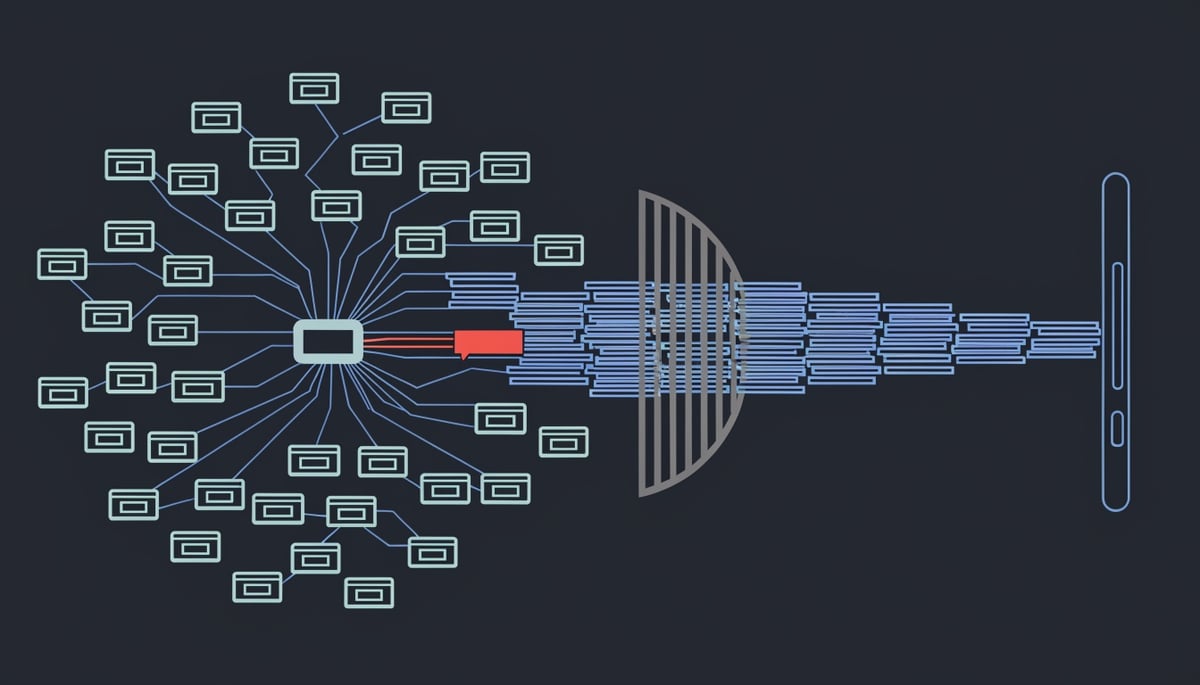
Google's data points to organized activity rather than isolated bad sites. Its systems analyze behavior across networks of related websites, including coordinated service-worker activity, which is the background browser code that delivers push messages without an open tab.
For your organization, the exposure sits on employee devices that browse the open web and then connect to company mail, VPN, or SaaS accounts. Credential phishing delivered through a notification bypasses your email gateway entirely, because the message never touches your mail flow.
Attack Chain: How Malware and Rogue Apps Abuse Android Notification Systems
The abuse starts with a single tap on a permission prompt. Once a site holds the notification permission on Android, it registers a service worker, a background script that keeps running after you close the tab, and that script becomes the delivery channel. Google's own description of the problem points at "coordinated service-worker activity" across networks of related websites, which is the technical signature of an operator running many domains off one push infrastructure.
The chain looks consistent across campaigns:
- Prompt farming. The lure page (a fake video player, captcha, or download gate) pushes the permission prompt early, before the visitor has any reason to trust the site. Google specifically tracks permission-prompt frequency and time-on-site as abuse signals, which tells you how thin these pages are.
- Subscription persistence. The service worker holds the push subscription independent of the original page. Closing the tab or clearing the tab history does not end the relationship.
- Content spoofing in the system tray. Notifications render inside the Android system surface with a site-supplied title, icon, and body. Operators use that placement for fake security alerts, package delivery failures, and fraudulent payment requests, all of which inherit the visual credibility of an OS-level message.
- Click-through to the payload. The notification click is a user-initiated navigation, which sidesteps pop-up blocking and lands the victim on a phishing page, a scam checkout, or an APK download. In ATT&CK terms this is T1204.001 (User Execution: Malicious Link) chained to phishing delivery.
The throughput involved is not subtle. Google notes that sites classified as disruptive can be capped at 1,000 messages per minute, with requests above that ceiling returning an HTTP 429. A rate limit set at that level exists because operators were pushing at that level, and it reframes push notifications as a bulk-delivery channel comparable to spam mail rather than a per-site convenience feature.
Infrastructure rotation is the second half of the model. Google says it analyzes behavior across groups of related sites so it can revoke permissions "even when the site content might not seem inherently malicious." That is a direct acknowledgement that individual domains in these networks are built to look benign under inspection, while the shared push backend does the delivery. For a security team, it means domain-by-domain blocklisting misses the operator, because the next domain in the set already holds valid subscriptions on the same devices.
Dormancy is a related technique. Chrome revokes permissions from sites that have gone inactive, which addresses subscriptions that sit quiet after the grant and get monetized later, often after the domain has changed hands. The grant a user made months ago is the asset being traded.
Push lures feed native payloads. BleepingComputer's parallel coverage of the Android BTMOB RAT describes a remote access trojan sold through underground channels, and RAT distribution depends on getting a user to a download page and through an install flow. Browser notifications supply that traffic at scale and at low cost. Once a RAT is installed with real device permissions, it operates with legitimate access rather than exploit code, which is why post-install detection is harder than blocking the initial lure.
Business and User Risk: Credential Theft, Device Compromise, and Brand Damage
Notification abuse pays off in three ways that show up on your balance sheet: harvested credentials, compromised devices, and fraudulent payments. Google names all three in its description of the problem, listing scams, malware, phishing attempts, and fraudulent payment requests as the payloads riding the push channel.
Start with credentials. A phishing link delivered through a browser notification arrives on the phone outside your email path, so your mail gateway, your link rewriting, and your attachment sandbox never see it.
Key Insight: If your staff use Android phones for work mail, a harvested Microsoft 365 or banking password gives an attacker a valid login rather than an exploit, and valid logins look like normal activity in your logs.
Device compromise follows the same route. Push messages that carry malware are pushing an install to a phone that may also hold your VPN profile, your MDM-enrolled apps, saved SSO sessions, and cached corporate documents. A compromised personal handset with those artifacts on it becomes a foothold you did not provision and cannot see from your endpoint console.
Fraudulent payment requests are the most direct loss. On Android, a browser notification lands in the same shade as messages from your actual banking and payments apps, which strips away the visual cue people rely on to tell a real transaction prompt from a fake one. If someone in your finance team approves a payment from a spoofed prompt, the money moves through legitimate rails and recovery depends on how fast your bank can act.
The consumer-facing side of this is scareware. Fake infection warnings and support numbers arrive as system-style alerts, and the people who call are handed to an operator who talks them into installing a remote access tool. When your customers see one of those on a phone right after visiting your site, they attribute the experience to you.
That points at the risk most businesses have not priced in: what happens to your own notifications when Chrome's classifiers make a judgment about your domain. Google says sites classified as disruptive can be limited to 1,000 messages per minute, with excess requests returning an HTTP 429. Those restrictions get more aggressive for repeat offenders and only reset after a period of non-disruptive behavior.
Read that against how your marketing and product teams use push, because the consequences are operational:
- Order confirmations, delivery updates, and account alerts sent through web push can be throttled or dropped if your domain trips the disruptive classification.
- Permission revocation applies to inactive sites and to sites that repeatedly trigger suspicious-notification warnings, so a dormant campaign domain quietly loses its subscriber base.
- Google analyzes behavior across networks of related websites, so a shared push vendor or a compromised subdomain can pull your legitimate properties into the same grouping.
There is a device-cost angle as well. Google credits its changes with cutting unnecessary background activity and reducing battery consumption, which is the flip side of what abusive push does to phones in your fleet. Before those controls, the visible symptom on your side was a stream of helpdesk tickets about battery drain and mobile data use, with no obvious cause because the offending code runs in a service worker rather than an installed app.
If your users can grant a permission that reaches them after they leave a site, that permission is an unmanaged delivery channel into devices that touch your data.
Detection and Response: Identifying Malicious Notification Campaigns
The first action is to audit which sites already hold notification permission in your browser. On desktop Chrome that list lives under Settings > Privacy and security > Site Settings > Notifications, and on Android under Settings > Notifications. Revoke anything you or your users do not actively rely on, because a permission granted eighteen months ago on a streaming mirror site is still a live delivery channel today.
Next, check Chrome's Safety Hub. Permissions that Chrome revoked automatically from inactive or repeatedly reported sites are listed there, and users can grant them back. That re-grant path matters for your help desk: a user who was told "the site broke" and restored the permission has just undone the block.
Teach users the fastest manual control as well. On Android you can unsubscribe from a site's notifications directly from the notification panel without opening the browser at all, which is the realistic response when someone is getting fake virus alerts in the middle of a meeting.
For short-term hardening, work through the app layer alongside the browser layer:
- Review
Settings > Appson managed Android devices for apps holding notification access or notification listener permissions they have no functional reason to hold. - Flag any app that was installed outside Google Play, particularly ones acquired after a user followed a link from a push message.
- Confirm that Chrome is current, since the reduced-interruption permission prompt and automatic revocation behavior only apply on supported builds.
On the monitoring side, the useful signals are behavioral. Watch for a sudden jump in notification volume on a single device, messages that arrive from a sender string the user cannot place, and any notification that asks for a login, a payment confirmation, or a "security check." Google's own scoring uses notification volume, permission-prompt frequency, and time spent on a site, and disruptive senders get rate limited to 1,000 messages per minute with excess requests returning an HTTP 429 error. If your own marketing or product team runs web push and starts seeing 429 responses or silent permission revocations, treat that as a signal your push infrastructure is either being abused or is triggering abuse heuristics, and investigate the domains sharing that infrastructure.
Longer term, push these controls into policy instead of user discipline. Mobile device management lets you set Chrome's notification default to blocked or ask-only on corporate profiles, restrict installs to approved sources, and maintain a blocklist for apps tied to known adware and push-fraud operators. Policy-enforced defaults survive device resets and user turnover in a way that one-time cleanup does not.
When a user reports that they entered credentials after tapping a notification, treat it as a live account compromise. Reset the password, revoke active sessions and refresh tokens, and check the account's MFA registrations for methods added since the incident, since attackers commonly enroll their own authenticator to keep access after a reset. In environments Capstone manages, Adlumin's identity monitoring surfaces the follow-on signal, an impossible-travel login or an unfamiliar sign-in to Microsoft 365 from the same stolen credential, which is often the first hard evidence that a phishing notification landed.
Record the delivering domain in the ticket and report it, so the same operator's other sites can be identified.
Broader Implications: Notification Systems as an Expanding Attack Surface
Google's throttling rule tells you how much volume these operators actually push. Sites classified as disruptive can be capped at 1,000 messages per minute, with excess requests returning an HTTP 429 error. A rate limit set that high exists because the abusive senders were running above it.
That number reframes what web push became. It is a broadcast channel with app-level reach and none of an app's distribution controls, which means an operator can reach a subscriber base at messaging-platform throughput from a domain that cost a few dollars.
The channel is attractive to attackers for reasons that have nothing to do with any single bug:
- OS-level rendering. The message draws in the system notification shade using the same visual treatment as your banking app and your MDM agent, so the delivery surface itself confers credibility the sender never earned.
- No sender authentication visible to the user. There is no cryptographic binding between the origin that queued the push and any verified identity a person can inspect at glance time. The user sees an icon and a title string, both attacker-controlled.
- Interaction speed. Notifications are designed to be dismissed or tapped in under a second, which is a poor environment for the deliberation phishing awareness training assumes.
- Emotional trigger templates. Fake security alerts, virus warnings, and payment or delivery prompts map cleanly onto T1566 Phishing and T1204.001 User Execution: Malicious Link, with the notification acting as the lure stage.
For a business, that combination means a phishing attempt reaches an employee's lock screen with the same visual authority as a legitimate internal alert, and no gateway sits between the two.
The same Push API exists on desktop Chrome, where the notification lands in the Windows Action Center or macOS Notification Center and carries the same absence of source verification. Apple's approach to web push on iOS requires a site to be added to the home screen before it can request permission, which raises the friction of the prompt-farming stage considerably. Native mobile apps face store review and signing requirements before they can push anything. Web push has neither, and that asymmetry is the structural reason abuse concentrated here.
Google's own framing is a layered one. The company describes a "Swiss cheese" defense model, where overlapping systems catch what earlier layers miss, with the stated goal that "if abuse slips through one layer, another is there to catch it." Layered filtering is a reasonable engineering answer, and it is also an admission that no single control is decisive.
The signals feeding those layers are behavioral: notification volume, time spent on a site, permission-prompt frequency, and engagement. Google notes that restrictions escalate for repeat offenders and reset after a period of non-disruptive behavior. That reset window is the part worth watching, because it defines a measurable path back to full sending capacity for an operator patient enough to age a domain quietly before switching payloads.
Durable change would need to happen below the browser. Cryptographic attestation binding a push message to a verified origin, an OS-level sandbox that visually separates web-originated notifications from app-originated ones, and revocation that propagates across an operator's whole domain portfolio rather than one host at a time would each remove capability rather than reduce throughput. None of those exist as a shipping standard today, so filtering remains the operative control.
What Organizations and Users Should Do Now
The practical takeaway from Google's announcement is a classification change, not a product change. Web push carries scams, malware, phishing, and fraudulent payment requests, which is the same payload mix your email gateway has been filtering for years. If you still treat a notification as a lower-risk message than an inbound email, that assumption no longer matches what the channel delivers.
Google's own framing supports that. The company describes its approach as a "Swiss cheese" defense model, with overlapping systems catching abuse at different stages, and states the goal plainly: "if abuse slips through one layer, another is there to catch it." That is a design built on the expectation that some deceptive notifications reach the device anyway. Browser-side filtering reduces your exposure. It does not remove the need for you to treat the channel as untrusted.
The second thing worth carrying forward is that Chrome's changes shift where the decision happens. Google redesigned the Android permission prompt to be less disruptive, so your users are now making the grant-or-decline choice with less pressure and less interruption. That helps, and it also means the permission decision sits entirely with the individual holding the phone, outside anything your security team sees.
Longer term, the missing piece is sender verification. Web push has no equivalent to the authentication layers email accumulated over two decades, so trust rests almost entirely on a permission granted once and rarely revisited. Until a verification mechanism exists for push senders, the origin of any notification your users receive stays effectively unverified.