Attackers have compromised at least six managed service providers (MSPs) and used their ConnectWise ScreenConnect environments to reach 286 endpoints across 47 downstream organizations, according to Huntress. The security firm first detected the campaign on Wednesday, with activity starting around 17:47 UTC, and says the victim count is still rising. ConnectWise has confirmed unauthorized access to ScreenConnect partner accounts and the installation of unauthorized remote-access software in customer environments. Details in this article come from analysis published by BleepingComputer.
The core technique is simple. Attackers use ScreenConnect's built-in Run Command feature to push rogue ScreenConnect clients onto managed endpoints. Those clients give the intruders their own remote access, separate from the MSP's legitimate ScreenConnect environment, so they can keep control of a device even if the provider's console access changes.
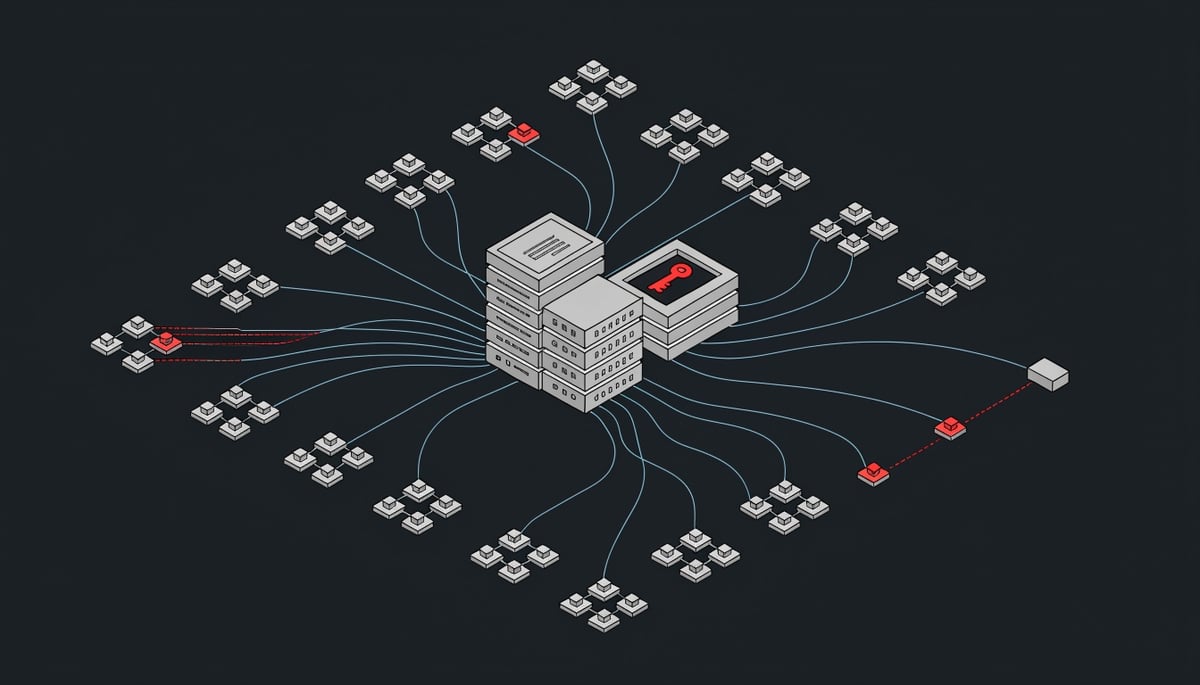
MSP compromise multiplies impact because one provider's remote access tooling already has trusted, administrative reach into every client it manages. If your firm relies on an outside IT provider, an attacker who takes over that provider's account gets the same access your provider uses to patch and support your machines. Huntress also warned that a technician's own workstation may be compromised when they open an interactive session with an infected customer device, which would carry the attack back into the provider.
"This appears to be abuse of legitimate functionality, aided using custom-built tooling that is, in some cases, compiled on the fly on the victim's computer," Spike Brandt of Huntress told BleepingComputer.
Huntress describes this as misuse of trusted tools, not a flaw in ScreenConnect's code. It has not determined how attackers first got in, though its telemetry points to compromised credentials or hijacked operator sessions.
The names involved also resemble legitimate content. ConnectWise suspects the attackers deployed additional software through five third-party extensions called Labtech Plus, RMM Plus, RMM+, RMM Plus Password Link, and RMM+ Password Link, all of which read like ordinary remote monitoring and management (RMM) add-ons. A separate batch file, SSA-2026-STATEMENT-15518787.bat, impersonates a Social Security Administration statement and references one of the same rogue client IDs. For your business, this means malicious components arrive under names your staff would expect to see in routine IT work or government correspondence.
How the Attack Chain Moves From Lure to Lateral Movement
Huntress has not determined how attackers first get into an MSP's ScreenConnect environment. Its telemetry points to compromised credentials or hijacked operator sessions, which maps to MITRE ATT&CK T1078 (Valid Accounts). An attacker holding a technician's login inherits that technician's reach across every managed device, so the activity in the console looks like routine support work.
ConnectWise's initial assessment adds a second possible route. The company suspects the actor deployed additional remote-access software through independent third-party extensions from the ScreenConnect Extensions marketplace, including RMM Plus Password Link and RMM+ Password Link. ConnectWise has not said whether these extensions were built to be malicious, were tampered with, or were abused after installation. It also states that having one installed does not by itself confirm a compromise.
Once inside, the attackers install rogue clients using the installer pattern /Bin/ScreenConnect.ClientSetup.msi?...&c=Exploited<N>, which is T1219 (Remote Access Software). The numbered "Exploited" tags are sequential, which is why Huntress believes other MSPs were compromised before this week's alerts. The rogue clients carry the IDs 2588ef5c15954b10 and ed630cc2c873b091, use the attacker name "Addmin," and connect to a relay at 185.99.255[.]28 and C2 hosts on dynamic DNS services. For your business, this means a client device can remain under outside control after the legitimate MSP session ends.
Execution relies partly on custom tooling that, according to Brandt, is in some cases compiled on the victim's computer at runtime. That behavior fits T1027.004 (Compile After Delivery) and produces binaries that do not match known hashes. The file runnew.cmd appears in Huntress's indicators, but the source does not describe what it does. Its name suggests a launcher, which remains unconfirmed.
The two scripts named for lateral movement, Panel-Lateral.ps1 and Run-Lateral-Full.bat, are likewise listed without published analysis. The most serious spread path involves technician workstations. ConnectWise has received reports, still being confirmed, that a technician's machine was compromised during an interactive session with an infected customer device. If confirmed, this would fall under T1021 (Remote Services), and the exact mechanism has not been publicly explained. A compromised technician workstation typically holds access to many client environments at once.
ToolboxRelayUploader.exe is the least documented artifact. Its name references the ScreenConnect Toolbox and a relay upload, and ConnectWise lists Toolbox records among the logs relevant to the incident. Whether it moves attacker tools into sessions or stages data for exfiltration under T1567 (Exfiltration Over Web Service) has not been established.
A separate batch file, SSA-2026-STATEMENT-15518787.bat, first uploaded to VirusTotal on July 25, 2026, shows how one rogue client ID was delivered months earlier. Its Social Security-themed name suggests a phishing lure. The script adds Microsoft Defender exclusions (T1562.001) and sets persistence through the Startup folder and Run registry key (T1547.001). It then pulls installer commands from amexsafekeyupdate.com, downloads ScreenConnect MSIs from cdn007-digitaldownloads[.]com and cyberrexdesign.screenconnect[.]com, uses PowerShell to look for ed630cc2c873b091 in processes and services, and reports success over Telegram. How this July activity relates to the MSP attacks is still unclear.
Filenames and lure names tied to the campaign:
- Scripts and binaries:
Panel-Lateral.ps1,Run-Lateral-Full.bat,runnew.cmd,ToolboxRelayUploader.exe - Earlier lure:
SSA-2026-STATEMENT-15518787.bat - Extensions: Labtech Plus, RMM Plus, RMM+, RMM Plus Password Link, RMM+ Password Link
- Stager: hxxps://ns.mo7sen[.]dev/EadF.php?p=4
- Secondary C2: sc.payproofkit[.]com (155.94.150[.]39, hostname WIN-FB5CKHMU4E1)
Huntress published these indicators while the campaign was still active, so additional artifacts may be added as analysis continues.
What MSP Compromise Means for Clients, Contracts, and Liability
A rogue ScreenConnect client gives an outside party the same interactive control of a device that your MSP uses for support. On an affected endpoint, that means viewing the screen, running commands, moving files, and installing more software under the permissions of the remote-access agent. The source does not confirm data theft, ransomware, or payment fraud in this campaign. Huntress does report a significant increase in 2026 in attacks that use legitimate RMM software as an initial payload, and that kind of access is commonly used to stage those follow-on actions.
ConnectWise has been direct that shutting off the suspect extensions does not undo what may already be on your systems:
"Disabling these 3rd party extensions is a precautionary containment measure. It does not establish that unauthorized software, persistence mechanisms, or access already present on affected devices has been removed."
For your business, this means the vendor's containment step does not answer the question your leadership, insurer, or regulator will ask, which is whether anyone still has access. On-premises ScreenConnect deployments carry an added burden. ConnectWise cannot disable the extensions remotely there, so the MSP operating the server has to do it.
The exposure window may also be longer than the disclosure date suggests. Huntress observed sequential attacker-assigned tags indicating other MSPs may have been compromised earlier. BleepingComputer separately found a batch file, SSA-2026-STATEMENT-15518787.bat, first uploaded to VirusTotal on July 25, 2026. It added Microsoft Defender exclusions, set persistence through the Startup folder and Run registry key, and checked for rogue client ID ed630cc2c873b091 before alerting the operator over Telegram. The link to the current attacks is unconfirmed. If your provider was affected, any review of what was accessed may need to reach back months instead of days.
The risk also runs in the other direction. ConnectWise has received reports, still being confirmed, of technician workstations compromised during interactive ScreenConnect sessions. A technician's machine typically holds access to many client environments. If one of those workstations is taken over, a single infected customer device could become a route into other clients served by the same MSP, including yours.
Whether breach-notification rules apply depends on what the attacker actually touched, and that is not yet established. If personal data on your endpoints was accessed, several regimes may come into play:
- GDPR, where your organization is usually the controller and the MSP a processor. Processors must inform controllers of a breach without undue delay, and controllers then face their own reporting deadlines to supervisory authorities.
- U.S. state breach notification laws, which vary in what counts as personal information and when unauthorized access triggers a duty to notify.
- Sector rules such as healthcare, financial services, or government contracting requirements, which can impose separate reporting duties to regulators or customers.
The practical difficulty is evidence. Your MSP's Run Command history, authentication logs, and extension records sit in the provider's ScreenConnect tenant, which you usually cannot see. From your side, an attacker using a valid MSP session looks like ordinary support activity. You depend on your provider to tell you what happened, and the provider is often still working that out with ConnectWise and Huntress.
Contracts become the next point of friction. Your master services agreement determines who pays for forensic investigation, who handles notification, how quickly the MSP must tell you about an incident, and whether the provider's insurance responds. Many agreements do not address compromise of the MSP's own remote-access platform specifically. If your MSP was among those affected, expect discussions with the provider and your cyber insurer about responsibility for investigation costs and any required notifications.
Detecting Rogue ScreenConnect Instances and Containing MSP-Originated Intrusions
If you operate a ScreenConnect instance, review its Run Command history now, going back several months, even if no alert has fired. Huntress found that the attackers' tags are sequential, which suggests MSPs beyond the six already identified were compromised earlier. A hunt that starts this week can miss those older intrusions entirely.
The steps below follow CISA's layered defense approach. They are grouped by urgency, with separate lists for providers and for the organizations that rely on them.
MSPs should complete these within 24 to 48 hours:
- If you host ScreenConnect on premises, disable the five flagged extensions manually. ConnectWise switched them off only in cloud-hosted environments. Do not re-enable or reinstall any of them until ConnectWise issues further guidance.
- Review authentication logs, extension installation records, administrative activity, Run Command history, and Toolbox records. Look for the operator name Addmin and installer requests matching
/Bin/ScreenConnect.ClientSetup.msi?...&c=Exploited<N>. - Do not open interactive ScreenConnect sessions with suspect devices. ConnectWise is checking reports that technician workstations were compromised this way. Investigate those endpoints with separate security tools.
- Rotate every technician and administrator credential tied to the console, and end active operator sessions. Huntress's telemetry points to stolen credentials or hijacked sessions as the likely entry point.
Client organizations should do the following in the same window:
- List every ScreenConnect and RMM agent on your endpoints and compare instance IDs and relay hosts against the instances your MSP has approved. Remove anything unknown, starting with client IDs 2588ef5c15954b10 and ed630cc2c873b091.
- Search endpoints for
Panel-Lateral.ps1,Run-Lateral-Full.bat,runnew.cmd,ToolboxRelayUploader.exe, andSSA-2026-STATEMENT-*.bat. - Block and alert on traffic to 185.99.255[.]28, 155.94.150[.]39, newnewnew.gotdns[.]org, soxnewwork.homedns[.]org, cdn007-digitaldownloads[.]com, sc.payproofkit[.]com, ns.mo7sen[.]dev, amexsafekeyupdate.com, and cyberrexdesign.screenconnect[.]com.
- Ask your MSP in writing whether it installed any of the flagged extensions and what its log review found.
Disabling an extension does not remove anything already planted. On any endpoint that matches an indicator, check for new Microsoft Defender exclusions and for entries in the Windows Startup folder and the Run registry key. The July batch script used all three for persistence. Removing a rogue client while those entries remain lets the attacker return after the next reboot.
Over the following weeks, both providers and clients should add these controls:
- Application allowlisting that permits only the specific remote access agents your MSP has approved, so an extra ScreenConnect client fails to run.
- MFA and source IP restrictions on the MSP's remote access console, so a stolen password alone cannot open it.
- Alerts for any new remote access software installation and for unusual outbound uploads from endpoints. A tool named
ToolboxRelayUploader.exesuggests the attackers move files out through the relay. - PowerShell script block logging, reviewed for process and service enumeration and for scripts that push commands to multiple hosts. Batch and PowerShell files compiled or launched from temporary locations deserve attention.
Longer term, clients should write MSP security requirements into their contracts. Those include MFA on management consoles, retained audit logs that the client can request, approval before marketplace extensions are added, and a fixed deadline for notifying clients of an incident. Segment MSP access so that a single compromised console reaches only the systems the provider actually supports, and require a separate administrator account for each technician so activity can be traced to a person.
Verifying Every Remote Access Tool on Your Network
Huntress's Spike Brandt described this activity as "abuse of legitimate functionality," supported by custom tooling that is sometimes compiled on the victim's own computer. No software flaw sits at the center of it. The attackers used the same remote support channel your provider relies on every day, so a rogue agent on your devices can look like ordinary IT administration.
That puts the focus on what remote access software is actually installed across your network and who controls it. A ScreenConnect client is only as trustworthy as the instance it reports to, and two agents with the same product name can answer to completely different operators. Because no patch closes this gap, your own inventory of those agents carries most of the weight.
The single most important action is to confirm that every ScreenConnect or other RMM agent on your endpoints belongs to an approved, known instance, and to remove any that do not. Ask your provider for the list of instances they run on your behalf, and treat any agent that is not on that list as unauthorized until someone accountable explains it.
If you are unsure which remote access tools are present on your machines, whoever manages your workstations or holds your IT support contract can produce that list and match each agent to a known instance. A security assessment is a reasonable follow-on step: a 15-minute call, then written findings across five areas, including remote access and security controls, along with dark web exposure, phishing risk, and employee training readiness.